
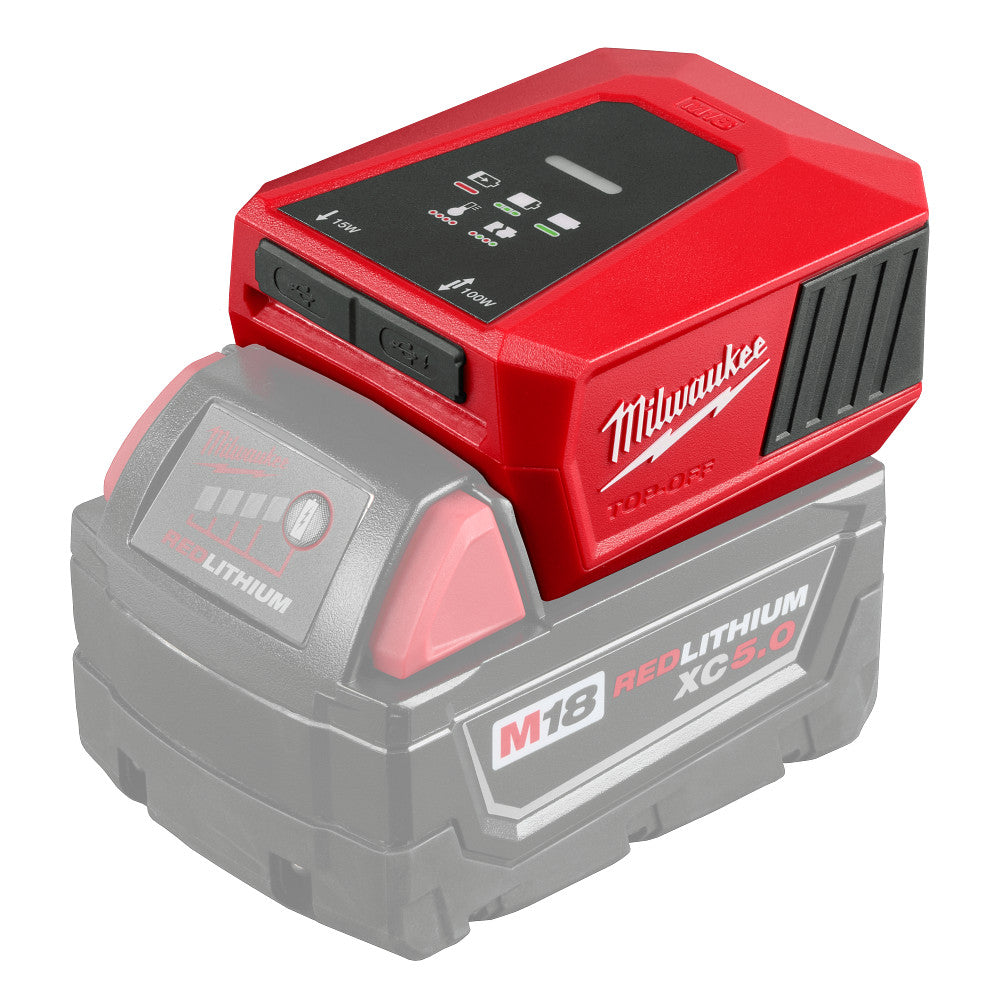
Milwaukee M18 Top-Off 2847 vs 2846: Which USB Charger Actually Fits Your Kit?
Short answer: The 2846-20 is Milwaukee's original M18 Top-Off — one USB-A port plus one USB-C, around 27W combined. The 2847-20 is the newer model with two USB-C PD ports that push up to 100W, plus a USB-A — built for charging laptops off an M18 battery. If your bag has phones, earbuds, and a tablet, the 2846 covers it. If you carry a USB-C laptop on the job, only the 2847 has the wattage to run it. Both are bare tools — M18 battery not included.
Milwaukee 2846 vs 2847 at a Glance
Side-by-Side Spec Table
| Spec | 2846-20 | 2847-20 |
|---|---|---|
| USB-A ports | 1 | 1 |
| USB-C ports | 1 | 2 |
| Max USB-C output | ~18W PD | Up to 100W PD |
| Total max output | ~27W | ~100W+ |
| Laptop charging | No (trickle only) | Yes (USB-C laptops) |
| Pass-through charging | No | No |
| Battery compatibility | All M18 packs | All M18 packs |
| Battery included | No | No |
The 2846-20's official name is the M18 TOP-OFF™ 175W Power Supply; both models are priced at $119.00 MSRP. The 2846-20 USB-C port has a 45W PD ceiling. Dimensions and weight for each unit are best confirmed at milwaukeetool.com or your retailer before buying.
What Is the Milwaukee M18 Top-Off?
How It Works
The Top-Off is a USB device charger that runs off an M18 battery. Plug an M18 pack into the bottom, and you get USB power out the top — no outlet needed. It does not charge the M18 battery; it only uses that battery to charge your devices.
Think of it as a purpose-built battery bank locked to the M18 ecosystem. Unlike a generic power bank, it draws from whatever pack you already have on your hip. Swap in a fresh battery, keep going.
Batteries That Fit
Every current Milwaukee M18 pack works — CP (compact), XC (extended capacity), HD (high demand), High Output, and Forge. Bigger Ah = more runtime. There's no REDLITHIUM required sticker; it's the M18 platform, full stop.
What won't fit: M12 or MX FUEL packs. The 2846 and 2847 are M18 only. See our M12 vs M18 comparison if you're unsure which platform your tools run on.
Milwaukee 2846-20: What It's Good For
Ports and Wattage
The 2846-20 runs one USB-A and one USB-C port. USB-A delivers standard 5V charging. The USB-C port supports 45W USB-C Power Delivery — fine for phones and tablets. Total continuous output is 175W.
Best Use Cases
- Topping up an iPhone or Android between cuts
- Charging earbuds, Bluetooth speakers, or a jobsite radio
- Running a tablet (iPad, Samsung Tab) — it'll charge, just not fast
- Powering a headlamp or USB work light on a large pack
For most tradespeople who just need their phone alive by quitting time, the 2846 does exactly that. It's smaller and lighter than the 2847, and you're not paying for a hundred watts you'll never pull.
Where It Falls Short
USB-C laptops are out. At ~27W total, the 2846 will trickle a MacBook Air but won't keep pace with active use. You'll be fighting the laptop's draw, not beating it.
No USB-A fast charge either — it runs standard 5V, so older cables work but don't expect QC 3.0 speeds.
Milwaukee 2847-20: What Changed and Who It's For
Ports and Wattage
The 2847-20 keeps the USB-A port but adds a second USB-C and ramps USB-C PD output up to 100W. That's the number that matters: 100W is where a 13" or 14" MacBook Air or Pro charges at full speed, and where a 16" MacBook Pro — which ships with a 140W adapter — will still run and slow-charge, holding or gaining battery during most work sessions.
Port 1 receives 100W dedicated, while Port 2 delivers 15W — both ports run at their rated outputs simultaneously rather than splitting a shared pool.
Best Use Cases
- Charging a USB-C laptop (MacBook, Dell XPS, ThinkPad, HP Spectre) while also keeping a phone alive
- Running a mobile hotspot and phone simultaneously from one pack
- Jobsite "office" setups — laptop on one port, phone on the other, no generator needed
- Any trade where big M18 HD or Forge packs are already on the truck
The 2847 makes sense the moment you're regularly carrying a USB-C laptop and don't want to haul a separate power bank. One M18 pack serves double duty.
Trade-Offs
It's bigger and costs more than the 2846 — check current pricing at milwaukeetool.com or Home Depot before buying. It still has no AC outlet — if you need 120V for anything with a wall plug, you want an inverter, not a Top-Off.
Users have noted fan noise under high draw — the 2847 has thermal management that activates when the load climbs. Not a dealbreaker for most jobsites, but worth knowing if noise is a concern.
Head-to-Head: Which One Should You Buy?
Buy the 2846-20 If…
- You charge phones, earbuds, tablets, and headlamps — nothing that needs 60W+
- You want a smaller, lighter accessory on your hip
- You're on a tighter budget and USB-A/basic-USB-C is enough
- You already have a separate solution for the laptop
Buy the 2847-20 If…
- You carry any USB-C laptop to the job — MacBook, XPS, ThinkPad, anything with a USB-C charge port
- You want to charge a laptop and a phone simultaneously from one M18 pack
- You're already running HD or Forge packs and want to put that capacity to use
- Dying laptop batteries mid-shift is an actual problem in your workflow
Buy Neither If…
Here's the straight read: if all you need is phone and tablet charging on the jobsite, an aftermarket USB-C fast charger for M18 does the same job for significantly less than Milwaukee's retail price.
Our USB-C fast charger for M18 batteries puts out up to 100W USB-C — plenty for phones, earbuds, and a tablet. It won't win on build quality or carry the Milwaukee warranty, but if you're a DIYer or a tradesperson whose heaviest device is an iPad, you don't need to pay for a 100W laptop charger.
Runtime: How Long Will Your M18 Battery Power Each Charger?
The math: volts × amp-hours = watt-hours, then watt-hours divided by your draw gives you estimated runtime.
5.0Ah XC Battery (~90Wh)
The 48-11-1850 XC 5.0Ah pack holds approximately 90Wh (18V × 5.0Ah).
| Draw scenario | Estimated runtime |
|---|---|
| 2846-20 at ~27W (both ports loaded) | ~3 hours |
| 2847-20 at ~100W (laptop + phone, full draw) | ~50 minutes |
| 2847-20 at ~30W (phone only, light draw) | ~2.5 hours |
The XC 5.0 handles phone charging for a full shift. At full 100W laptop draw, it empties fast — bring a second pack, or step up.
12.0Ah HD Battery (~216Wh)
The 48-11-1812 HD 12.0Ah holds approximately 216Wh (18V × 12.0Ah).
| Draw scenario | Estimated runtime |
|---|---|
| 2846-20 at ~27W (both ports loaded) | ~7–8 hours |
| 2847-20 at ~100W (full laptop draw) | ~2 hours |
| 2847-20 at ~30W (phone, light draw) | ~6 hours |
At 100W you drain an HD12 in about two hours. That's still a full morning session. And most ultrabooks in real use pull 45–65W rather than their rated ceiling, so runtime stretches further in practice.
*Real-world efficiency losses and device charging curves typically knock 10–15% off these numbers. For a deeper look at battery runtime math: see our battery runtime guide.*
Milwaukee Top-Off vs M18 Inverter: Which Do You Actually Need?
For the full breakdown: Top-Off vs inverter comparison
USB-Only vs 120V AC Outlet
Both Top-Off SKUs are USB only — that's a hard limit. If you need 120V AC for anything with a standard wall plug (a laptop brick, a charger you already own, a small shop vac, a blender at a jobsite cookout), neither Top-Off gets you there.
The M18 power inverter — a 150W unit with a 120V socket, two USB ports, and an LED — opens up anything with a standard plug. That includes non-USB-C laptops, LED work lights, and any charger you already have in your truck.
Efficiency and Weight Trade-Off
The Top-Off has an efficiency edge for USB charging. DC → USB-C PD is more direct than DC → AC → USB-C adapter → device. Less heat wasted, more charge delivered per watt-hour.
The inverter wins on flexibility. One accessory, anything with a plug. If you're the crew member who charges everything and needs a real outlet more often than a fast USB port, the inverter is the right tool.
For dedicated laptop charging: the 2847 wins. For a general jobsite power outlet: the inverter wins. For phones and tablets on a budget: the aftermarket USB-C charger wins.
FAQ
What's the difference between the Milwaukee 2846-20 and 2847-20?
The 2846 is Milwaukee's original M18 Top-Off — one USB-A, one USB-C, about 27W total. The 2847 adds a second USB-C port and pushes up to 100W of USB-C PD for laptop charging. Both use the same M18 battery mount. The 2847 is bigger, heavier, and pricier; the 2846 is the leaner pick for phones and tablets.
Does the Milwaukee Top-Off come with a battery?
No. Both the 2846-20 and 2847-20 are sold as bare tools. You supply the M18 battery.
Can the Milwaukee 2847-20 charge a MacBook Pro?
Yes. The 100W USB-C PD output is enough to charge a 13" or 14" MacBook Air or Pro at full speed. A 16" MacBook Pro (which ships with a 140W adapter) will run and slow-charge at 100W USB-C PD — Apple requires 140W for full fast-charge speeds, but 100W is enough to hold or gain battery during most work sessions.
Will the 2846-20 fast-charge a laptop?
Not effectively. At ~27W total, it'll trickle a USB-C laptop but won't keep up with active use. You'll deplete the laptop more slowly than without it, but you won't charge it. The 2846 is a phone and tablet charger.
What batteries fit the Top-Off?
Every current Milwaukee M18 pack: CP, XC, HD, High Output, and Forge. M12 and MX FUEL packs don't fit. Bigger Ah rating = more runtime out of both units.
How long will an M18 battery power the Top-Off?
On a 5.0Ah XC (~90Wh): about 3 hours at the 2846's 27W draw, under an hour at the 2847's full 100W. On a 12.0Ah HD (~216Wh): roughly 7–8 hours at 27W, about 2 hours at full 100W. Real-world numbers run 10–15% below these estimates.
Is the Milwaukee Top-Off worth it vs a cheaper USB-C M18 charger?
If you need laptop charging or the Milwaukee warranty, yes. If you need phones and tablets covered without the price premium, an aftermarket USB-C fast charger for M18 handles it. The M18 USB-C fast charger delivers up to 65W USB-C for a fraction of the retail cost.
Can I use the Top-Off to charge my M18 battery?
No. It's a device charger powered by an M18 battery, not a battery charger. USB power only flows out. To charge your M18 packs, you need a Milwaukee 48-59-series charger — see our M18 charger comparison for a look at the M18 charger lineup.
The choice comes down to what's in your bag. Phones, earbuds, a tablet — the 2846-20 handles it without the extra weight or cost. A USB-C laptop on the job — the 2847-20 is the only M18 tool that can actually run it.
And if Milwaukee's retail price is more than your use case warrants, the M18 USB-C fast charger covers everyday jobsite charging at a fraction of the cost. For the full Milwaukee accessory lineup — chargers, inverters, and more — head to the Milwaukee collection.
*Related:*
- Charging a MacBook with the 2847 — detailed guide
- Top-Off vs inverter — full breakdown
- M18 charger comparison — charger options reviewed